> ## Documentation Index
> Fetch the complete documentation index at: https://docs.codeqr.io/llms.txt
> Use this file to discover all available pages before exploring further.
# Introduction
> Learn more about the @codeqr/analytics script and how to install it.
`@codeqr/analytics` is a lightweight (\~1kb), [open-source](https://github.com/codeqr-io/analytics) client-side script for [tracking conversion events](https://codeqr.io/help/article/codeqr-conversions) with CodeQR.
The script handles the detection of the `cq_id` query parameter and storing it as a first-party cookie, which will be used to attribute subsequent conversion events to the original link.
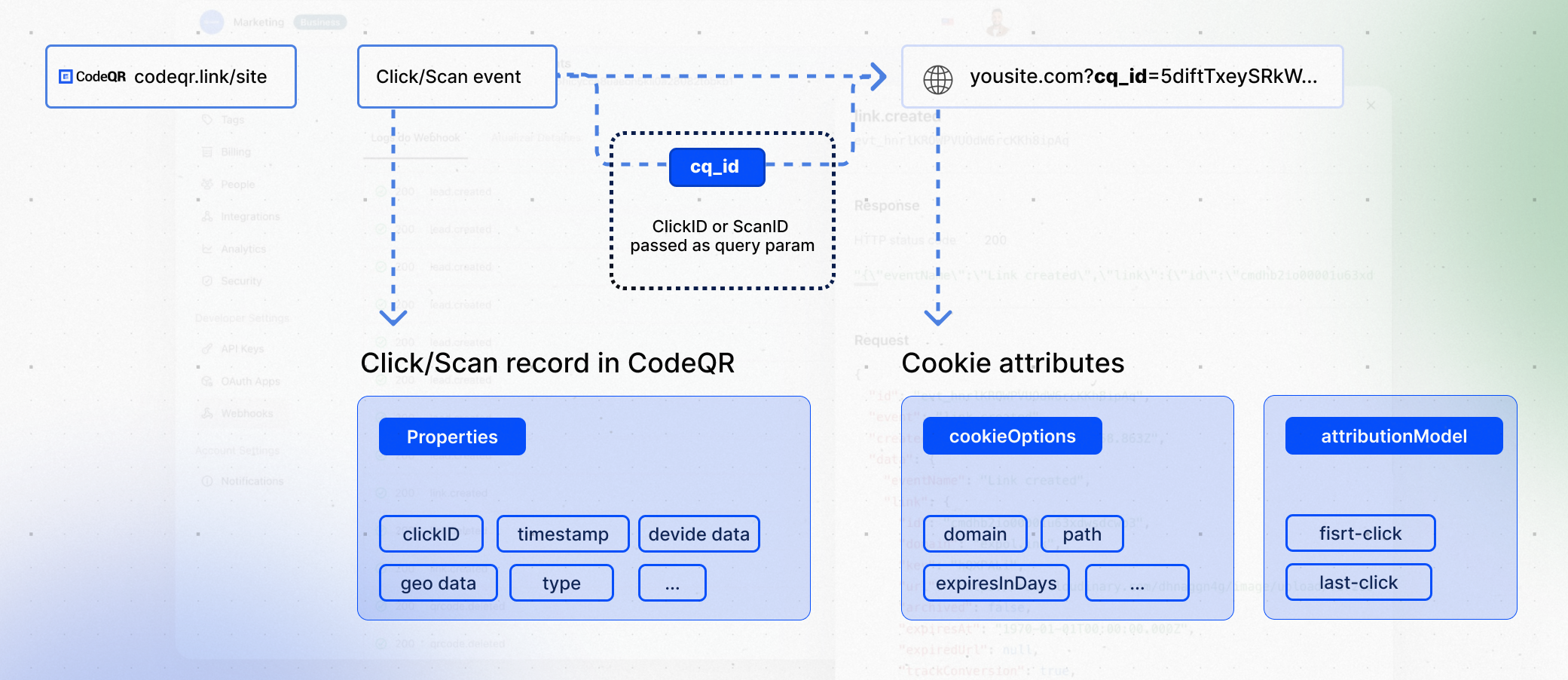 If you're running a referral program, this script also lets you [track clicks on the client-side](/sdks/client-side/features/client-side-click-tracking) using query parameters (e.g. `?via=john`). This gives you the flexibility to track clicks directly on your website or app, without needing to rely on link redirects.
## Installation guides
You can install the `@codeqr/analytics` script in several different ways:
Add CodeQR Analytics to your React app
Add CodeQR Analytics to your website
}
href="https://docs.codeqr.io/sdks/client-side/installation-guides/framer"
>
Add CodeQR Analytics to your Framer site
Add CodeQR Analytics to your WP site
Add CodeQR Analytics to your Webflow site
## Features
The `@codeqr/analytics` script comes with the following features:
* [Conversion-tracking](/sdks/client-side/features/conversion-tracking)
* [Client-side click-tracking](/sdks/client-side/features/client-side-click-tracking)
* [Cross-domain tracking](/sdks/client-side/features/cross-domain-tracking)
* [Reverse-proxy support](/sdks/client-side/features/reverse-proxy-support)
## Properties
You can pass the following props to the `@codeqr/analytics` script to customize its behavior:
The base URL for the CodeQR API. This is useful for [setting up reverse
proxies](/sdks/client-side/features/reverse-proxy-support) to avoid
adblockers.
The attribution model to use for the analytics event. The following
attribution models are available:
* `first-click`: The first click model
gives all the credit to the first touchpoint in the customer journey.
* `last-click`: The last click model gives all the credit to the last
touchpoint in the customer journey.
Custom properties to pass to the cookie. Refer to
[MDN's Set-Cookie documentation](https://developer.mozilla.org/en-US/docs/Web/HTTP/Headers/Set-Cookie) for
all available options.
Specifies the value for the `Domain` Set-Cookie attribute. This is useful
for cross-domain tracking. Example: `.example.com`
Specifies the `Date` object to be the value for the `Expires` Set-Cookie
attribute. Example: `new Date('2024-12-31')`
Specifies the number (in days) to be the value for the `Expires`
Set-Cookie attribute.
For example, to set the cookie window to 60 days (instead of the default 90 days), you can add the following to your script:
```html theme={null}
```
Specifies the value for the `Path` Set-Cookie attribute. By default, the
path is considered the "default path". Example: `/`
Configure the domains that CodeQR will track. The following properties are available:
The CodeQR custom domain for [referral program client-side click tracking](http://d.to/clicks/refer) (previously `data-short-domain`).
Example: `refer.codeqr.io`
The CodeQR short domain for tracking site visits.
Example: `site.codeqr.io`
An array of domains for cross-domain tracking. When configured, the existing `cq_id` cookie
will be automatically appended to all outbound links targeting these domains to enable
cross-domain tracking across different applications.
Example: `"codeqr.link, git.new"`
The query parameter to listen to for client-side click-tracking (e.g.
`?via=abc123`).
## Open-source examples
Here are some open-source code examples that you can referece:
See the full example on GitHub.
See the full example on GitHub.
If you're running a referral program, this script also lets you [track clicks on the client-side](/sdks/client-side/features/client-side-click-tracking) using query parameters (e.g. `?via=john`). This gives you the flexibility to track clicks directly on your website or app, without needing to rely on link redirects.
## Installation guides
You can install the `@codeqr/analytics` script in several different ways:
Add CodeQR Analytics to your React app
Add CodeQR Analytics to your website
}
href="https://docs.codeqr.io/sdks/client-side/installation-guides/framer"
>
Add CodeQR Analytics to your Framer site
Add CodeQR Analytics to your WP site
Add CodeQR Analytics to your Webflow site
## Features
The `@codeqr/analytics` script comes with the following features:
* [Conversion-tracking](/sdks/client-side/features/conversion-tracking)
* [Client-side click-tracking](/sdks/client-side/features/client-side-click-tracking)
* [Cross-domain tracking](/sdks/client-side/features/cross-domain-tracking)
* [Reverse-proxy support](/sdks/client-side/features/reverse-proxy-support)
## Properties
You can pass the following props to the `@codeqr/analytics` script to customize its behavior:
The base URL for the CodeQR API. This is useful for [setting up reverse
proxies](/sdks/client-side/features/reverse-proxy-support) to avoid
adblockers.
The attribution model to use for the analytics event. The following
attribution models are available:
* `first-click`: The first click model
gives all the credit to the first touchpoint in the customer journey.
* `last-click`: The last click model gives all the credit to the last
touchpoint in the customer journey.
Custom properties to pass to the cookie. Refer to
[MDN's Set-Cookie documentation](https://developer.mozilla.org/en-US/docs/Web/HTTP/Headers/Set-Cookie) for
all available options.
Specifies the value for the `Domain` Set-Cookie attribute. This is useful
for cross-domain tracking. Example: `.example.com`
Specifies the `Date` object to be the value for the `Expires` Set-Cookie
attribute. Example: `new Date('2024-12-31')`
Specifies the number (in days) to be the value for the `Expires`
Set-Cookie attribute.
For example, to set the cookie window to 60 days (instead of the default 90 days), you can add the following to your script:
```html theme={null}
```
Specifies the value for the `Path` Set-Cookie attribute. By default, the
path is considered the "default path". Example: `/`
Configure the domains that CodeQR will track. The following properties are available:
The CodeQR custom domain for [referral program client-side click tracking](http://d.to/clicks/refer) (previously `data-short-domain`).
Example: `refer.codeqr.io`
The CodeQR short domain for tracking site visits.
Example: `site.codeqr.io`
An array of domains for cross-domain tracking. When configured, the existing `cq_id` cookie
will be automatically appended to all outbound links targeting these domains to enable
cross-domain tracking across different applications.
Example: `"codeqr.link, git.new"`
The query parameter to listen to for client-side click-tracking (e.g.
`?via=abc123`).
## Open-source examples
Here are some open-source code examples that you can referece:
See the full example on GitHub.
See the full example on GitHub.